
Appearance
配置meilisearch
1、服务端配置
1. 1、部署
官方对于部署的介绍非常详细,各种方案都提供了,我这里选择使用 docker 来进行部署。
添加服务启动脚本start.sh到/tmp/scraper目录
sh
docker run -itd --name meilisearch -p 7700:7700 --restart=always \
  -e MEILI_ENV="production" -e MEILI_NO_ANALYTICS=true \
  -e MEILI_MASTER_KEY="自定义一个不少于16字节的秘钥" \
  -v $(pwd)/meili_data:/meili_data \
getmeili/meilisearch自建的时候,需要将环境变量声明为生产,并且必须指定 master-key,否则将会提示无法使用。
然后运行该脚本,服务启动,通过监听日志,查看服务状态是否正常。
也可以请求服务的健康接口进行验证:
sh
$ curl -s http://localhost:7700/health | jq
{
  "status": "available"
}注意,生产模式下,只有这一个接口是不需要秘钥认证即可访问的,其他接口访问的时候都需要带上秘钥。
1.2、创建搜索的key
上边有了一个 master-key 用于爬虫抓取使用,还需要创建一个只有搜索权限的 key,可通过如下命令进行创建search.sh到 /tmp/scraper目录
sh
curl \
  -X POST 'http://localhost:7700/keys' \
  -H 'Content-Type: application/json' \
  -H 'Authorization: Bearer 你自定义的秘钥' \
  --data-binary '{
    "description": "vp.xiaoying.org.cn key",
    "actions": ["search"],
    "indexes": ["blog"],  // 第四步建立索引抓取配置中的index_uid的值需与该值保持一致
    "expiresAt": "2099-01-01T00:00:00Z"
}'创建完成之后,能看到返回内容中有一个 key 的字段,就是这个只有搜索权限的 key 了。
1.3、添加域名
这个根据自己的实际情况,我这里给 Nginx 添加配置文件,配置域名:
nginx
server {
    listen 443 ssl;
    server_name vp.xiaoying.org.cn;

    ssl_certificate /etc/ssl/certs/vp.xiaoying.org.cn_bundle.crt;
    ssl_certificate_key /etc/ssl/certs/vp.xiaoying.org.cn.key;
    ssl_ciphers ECDHE-RSA-AES128-GCM-SHA256:ECDHE:ECDH:AES:HIGH:!NULL:!aNULL:!MD5:!ADH:!RC4;
    ssl_protocols TLSv1 TLSv1.1 TLSv1.2;
    ssl_prefer_server_ciphers on;

    location ^~ /multi-search/ {
        proxy_set_header Host $host;
        proxy_set_header   X-Forwarded-Proto $scheme;
        proxy_set_header   X-Real-IP         $remote_addr;
        proxy_pass http://127.0.0.1:7700;
    }

}这样就完成了与meilisearch一样的服务端配置信息:
- 服务端 URL(https://vp.xiaoying.org.cn/)
- master key(第一步自定义)
- search key(第二步生成)
1.4、建立索引
官方提供了爬虫工具,我们只需要进行简单的配置,即可将数据索引建立起来。
关于这段配置流程,官方文档同样给了详细的说明:抓取你的内容 (opens new window)。
新建config.json如下
json
{
    "index_uid": "teek",
    "sitemap_urls": ["https://vp.xiaoying.org.cn/sitemap.xml"],
    "start_urls": ["https://vp.xiaoying.org.cn/"],
    "stop_urls": [],
    "selectors": {
        "lvl0": {
            "selector": "section.has-active div h2",
            "defaultValue": "Documentation"
        },
        "lvl1": ".content h1",
        "lvl2": ".content h2",
        "lvl3": ".content h3",
        "lvl4": ".content h4",
        "lvl5": ".content h5",
        "content": ".content p, .content li"
    },
    "strip_chars": " .,;:#",
    "scrap_start_urls": true,
    "custom_settings": {
        "searchableAttributes": [
            "hierarchy_lvl2",
            "hierarchy_lvl3",
            "hierarchy_lvl4",
            "hierarchy_lvl5",
            "content"
        ],
        "displayedAttributes": [
            "hierarchy_lvl1",
            "hierarchy_lvl2",
            "hierarchy_lvl3",
            "hierarchy_lvl4",
            "hierarchy_lvl5",
            "content",
            "hierarchy_lvl0",
            "url",
            "anchor"
        ],
        "filterableAttributes": [
            "hierarchy_lvl2",
            "hierarchy_lvl3",
            "hierarchy_lvl4",
            "hierarchy_lvl5"
        ]
    },
}index_uid :为索引名称,如果服务端没有,则会自动创建,需与第二步的indexes保持一致。
新建teek.sh如下对内容进行抓取:
sh
docker run -t --rm \
  --network=host \
  -e MEILISEARCH_HOST_URL='http://localhost:7700' \
  -e MEILISEARCH_API_KEY='第一步自定义的Master Key' \
  -v /tmp/scraper/config.json:/docs-scraper/config.json \
getmeili/docs-scraper pipenv run ./docs_scraper config.json将config.json与teek.sh放到/tmp/scraper目录下,然后通过如下命令运行爬虫对内容进行抓取:
sh
sh teek.sh提示
如果脚本跑完发现最后匹配到了 0 条,可能是上边 config.json 中元素选择的问题,可以到自己博客中,点击检查来查看元素的正确名称。
2、代码配置
2.1、编写Meilisearch.vue
vue
<template>
<div>
<!-- 搜索触发按钮 -->
<button aria-label="Search" class="DocSearch DocSearch-Button" type="button" @click="toggleSearch">
<span class="DocSearch-Button-Container">
<span class="vp-icon DocSearch-Search-Icon"></span>
<span class="DocSearch-Button-Placeholder">Search</span>
</span>
<span class="DocSearch-Button-Keys">
<kbd class="DocSearch-Button-Key"></kbd>
<kbd class="DocSearch-Button-Key">K</kbd>
</span>
</button>
<!-- 搜索弹窗 -->
<div v-if="isSearchOpen" aria-labelledby="docsearch-label" aria-modal="true"
class="DocSearch DocSearch-Container" role="dialog" @click="closeSearch">
<div class="DocSearch-Modal" @click.stop>
<header class="DocSearch-SearchBar">
<form class="DocSearch-Form" @submit.prevent>
<label id="docsearch-label" class="DocSearch-MagnifierLabel" for="docsearch-input">
<span class="DocSearch-VisuallyHiddenForAccessibility">Search</span>
</label>
<input id="docsearch-input" ref="searchInput" v-model="searchQuery"
:placeholder="meiliConfig.placeholder || '搜索文档...'" autocapitalize="off" autocomplete="off"
autocorrect="off" autofocus class="DocSearch-Input" spellcheck="false" type="search"
@input="handleInput" @keydown.down.prevent="moveDown" @keydown.up.prevent="moveUp"
@keydown.esc.prevent="closeSearch" @keydown.enter.prevent="goToHit" />
<button v-if="searchQuery" class="DocSearch-Reset" type="reset" @click="clearSearch">✕</button>
</form>
<button class="DocSearch-Cancel" type="button" @click="closeSearch">Cancel</button>
</header>
<!-- 搜索结果区域 -->
<div class="DocSearch-Dropdown">
<div ref="hitsContainer" class="DocSearch-Dropdown-Container">
<!-- 分组渲染搜索结果 -->
<section v-for="(group, groupIdx) in groupedHits" v-if="searchQuery" :key="groupIdx"
class="DocSearch-Hits">
<div class="DocSearch-Hit-source">{{ group.title }}</div>
<ul :id="'docsearch-hits' + groupIdx + '-list'" role="listbox">
<!-- 列表项:添加active类模拟默认hover,使用highlightKeyword处理关键词高亮 -->
<li v-for="(hit, itemIdx) in group.items" :key="itemIdx"
:class="{ 'active': currentGroupIndex === groupIdx && currentItemIndex === itemIdx }"
class="DocSearch-Hit" role="option"
@mouseenter="handleMouseEnter(groupIdx, itemIdx)">
<a :href="hit.url" @click="goToSpecificHit(groupIdx, itemIdx, $event)">
<div class="DocSearch-Hit-Container">
<div class="DocSearch-Hit-content-wrapper">
<!-- 主标题:关键词高亮 -->
<span class="DocSearch-Hit-title"
v-html="highlightKeyword(hit.hierarchy_lvl2, searchQuery)"></span>
<!-- 副标题:仅匹配关键词时展示 + 高亮 -->
<span
v-if="hit.hierarchy_lvl3 && isMatch(hit.hierarchy_lvl3, searchQuery)"
class="DocSearch-Hit-path"
v-html="highlightKeyword(hit.hierarchy_lvl3, searchQuery)"></span>
<!-- 内容:仅匹配关键词时展示 + 高亮 -->
<span v-if="hit.content && isMatch(hit.content, searchQuery)"
class="DocSearch-Hit-path"
v-html="highlightKeyword(hit.content, searchQuery)"></span>
</div>
<div class="DocSearch-Hit-action">
<svg height="20" viewBox="0 0 20 20" width="20">
<g fill="none" fill-rule="evenodd" stroke="currentColor"
stroke-linecap="round" stroke-linejoin="round">
<path d="M18 3v4c0 2-2 4-4 4H2"></path>
<path d="M8 17l-6-6 6-6"></path>
</g>
</svg>
</div>
</div>
</a>
</li>
</ul>
</section>
<!-- 无结果提示 -->
<div v-if="searchQuery && hits.length === 0" class="DocSearch-NoResults">
No results for "{{ searchQuery }}"
</div>
</div>
</div>
<!-- Footer 布局 -->
<footer class="DocSearch-Footer">
<div class="DocSearch-Logo">
<span class="DocSearch-Label">Search by</span>
<a href="https://vp.xiaoying.org.cn/pages/09b133" rel="noopener noreferrer" target="_blank"
style="background-color: #734894;">
<img alt="Meilisearch's logo" data-nimg="1" decoding="async" fetchpriority="high"
height="25" src="https://www.meilisearch.com/_next/static/media/logo.cd874c57.svg" width="162">
</a>
</div>
<ul class="DocSearch-Commands">
<li><kbd class="DocSearch-Commands-Key">
<svg aria-label="Enter key" height="15" role="img" width="15">
<g fill="none" stroke="currentColor" stroke-linecap="round" stroke-linejoin="round"
stroke-width="1.2">
<path d="M12 3.53088v3c0 1-1 2-2 2H4M7 11.53088l-3-3 3-3"></path>
</g>
</svg></kbd><span class="DocSearch-Label">选择</span></li>
<li>
<kbd class="DocSearch-Commands-Key">
<svg aria-label="Arrow down" height="15" role="img" width="15">
<g fill="none" stroke="currentColor" stroke-linecap="round" stroke-linejoin="round"
stroke-width="1.2">
<path d="M7.5 3.5v8M10.5 8.5l-3 3-3-3"></path>
</g>
</svg>
</kbd><kbd class="DocSearch-Commands-Key"><svg aria-label="Arrow up" height="15" role="img"
width="15">
<g fill="none" stroke="currentColor" stroke-linecap="round" stroke-linejoin="round"
stroke-width="1.2">
<path d="M7.5 11.5v-8M10.5 6.5l-3-3-3 3"></path>
</g>
</svg></kbd><span class="DocSearch-Label">切换</span>
</li>
<li><kbd class="DocSearch-Commands-Key"><svg aria-label="Escape key" height="15" role="img"
width="15">
<g fill="none" stroke="currentColor" stroke-linecap="round" stroke-linejoin="round"
stroke-width="1.2">
<path
d="M13.6167 8.936c-.1065.3583-.6883.962-1.4875.962-.7993 0-1.653-.9165-1.653-2.1258v-.5678c0-1.2548.7896-2.1016 1.653-2.1016.8634 0 1.3601.4778 1.4875 1.0724M9 6c-.1352-.4735-.7506-.9219-1.46-.8972-.7092.0246-1.344.57-1.344 1.2166s.4198.8812 1.3445.9805C8.465 7.3992 8.968 7.9337 9 8.5c.032.5663-.454 1.398-1.4595 1.398C6.6593 9.898 6 9 5.963 8.4851m-1.4748.5368c-.2635.5941-.8099.876-1.5443.876s-1.7073-.6248-1.7073-2.204v-.4603c0-1.0416.721-2.131 1.7073-2.131.9864 0 1.6425 1.031 1.5443 2.2492h-2.956">
</path>
</g>
</svg></kbd><span class="DocSearch-Label">关闭</span></li>
</ul>
</footer>
</div>
</div>
</div>
</template>
<script setup>
import { instantMeiliSearch } from '@meilisearch/instant-meilisearch';
import instantsearch from 'instantsearch.js';
import { hits as hitsWidget } from 'instantsearch.js/es/widgets';
import { useData } from 'vitepress';
import { computed, nextTick, onUnmounted, ref } from 'vue';
const { theme } = useData();
const meiliConfig = computed(() => theme.value.meilisearch || {});
const isSearchOpen = ref(false);
const searchQuery = ref('');
const hits = ref([]);
const searchInput = ref(null);
const hitsContainer = ref(null);
let searchInstance = null;
let searchClient = null;
let selectedIndex = ref(-1);
const currentGroupIndex = ref(-1);
const currentItemIndex = ref(-1);
// 按 hierarchy_lvl1 分组展示搜索结果
const groupedHits = computed(() => {
const groupMap = new Map();
hits.value.forEach(hit => {
const groupKey = hit.hierarchy_lvl1 || 'Documentation';
if (!groupMap.has(groupKey)) {
groupMap.set(groupKey, { title: groupKey, items: [] });
}
groupMap.get(groupKey).items.push(hit);
});
return Array.from(groupMap.values()).sort((a, b) => a.title.localeCompare(b.title));
});
// 同步选中状态(currentGroupIndex/currentItemIndex → selectedIndex)
const updateSelectedIndex = () => {
const groups = groupedHits.value;
// 检查 groups 是否为空
if (!groups || groups.length === 0) {
selectedIndex.value = -1;
return;
}
// 检查 group 和 item 索引是否有效
if (
currentGroupIndex.value === -1 ||
currentItemIndex.value === -1 ||
currentGroupIndex.value >= groups.length
) {
selectedIndex.value = -1;
return;
}
const currentGroup = groups[currentGroupIndex.value];
// 检查当前分组是否有内容
if (!currentGroup || !currentGroup.items || currentItemIndex.value >= currentGroup.items.length) {
selectedIndex.value = -1;
return;
}
let prevItemsCount = 0;
for (let i = 0; i < currentGroupIndex.value; i++) {
prevItemsCount += groups[i].items.length;
}
selectedIndex.value = prevItemsCount + currentItemIndex.value;
};
// 切换搜索弹窗显示
const toggleSearch = async () => {
isSearchOpen.value = !isSearchOpen.value;
if (isSearchOpen.value) {
await nextTick();
searchInput.value?.focus();
initMeiliSearch();
} else {
clearSearch();
}
};
// 初始化 MeiliSearch 搜索实例
const initMeiliSearch = () => {
if (searchInstance || !meiliConfig.value.host || !meiliConfig.value.apiKey || !meiliConfig.value.indexName) return;
searchClient = instantMeiliSearch(meiliConfig.value.host, meiliConfig.value.apiKey).searchClient;
searchInstance = instantsearch({
indexName: meiliConfig.value.indexName,
searchClient,
routing: false
});
searchInstance.addWidgets([
hitsWidget({
container: hitsContainer.value,
transformItems: items => {
// 确保每个搜索结果项都有正确的url,规范化URL格式
const validItems = items.map(item => {
// 如果有anchor但没有url,构造一个url
if (!item.url && item.anchor) {
item.url = new URL(`#${item.anchor}`, window.location.href).href;
}
// 如果既没有url也没有anchor,使用当前页面URL
if (!item.url) {
item.url = window.location.href;
}
return item;
}).filter(item => item.url); // 只保留有url的项目
hits.value = validItems;
// 默认选中第一个项(模拟hover)
if (validItems.length > 0) {
currentGroupIndex.value = 0; // 第一个分组
currentItemIndex.value = 0; // 分组第一个项
// 等待DOM渲染后执行滚动(确保元素存在)
nextTick(() => scrollToActiveItem());
} else {
// 无结果时重置状态
currentGroupIndex.value = -1;
currentItemIndex.value = -1;
selectedIndex.value = -1;
}
return validItems;
},
templates: {
item: () => ''
}
})
]);
searchInstance.start();
};
// 处理输入:为空时清空结果,不为空时执行搜索
const handleInput = () => {
if (searchInstance?.helper) {
if (searchQuery.value) {
searchInstance.helper.setQuery(searchQuery.value).search();
} else {
clearSearch();
}
}
};
// 清空搜索(输入、结果、选中状态)
const clearSearch = () => {
searchQuery.value = '';
hits.value = [];
selectedIndex.value = -1;
currentGroupIndex.value = -1;
currentItemIndex.value = -1;
};
// 关闭搜索弹窗
const closeSearch = () => {
isSearchOpen.value = false;
clearSearch();
};
const handleMouseEnter = (groupIdx, itemIdx) => {
currentGroupIndex.value = groupIdx; // 更新分组索引
currentItemIndex.value = itemIdx; // 更新项索引
updateSelectedIndex(); // 同步全局索引
};
// 跳转到特定搜索结果项
const goToSpecificHit = (groupIdx, itemIdx, event) => {
// 阻止默认跳转行为
event.preventDefault();
// 更新选中索引
currentGroupIndex.value = groupIdx;
currentItemIndex.value = itemIdx;
// 执行跳转
goToHit();
};
// 跳转到选中的搜索结果
const goToHit = () => {
// 直接使用当前分组和项索引获取正确的搜索结果项
if (currentGroupIndex.value >= 0 && currentItemIndex.value >= 0 &&
groupedHits.value[currentGroupIndex.value] &&
groupedHits.value[currentGroupIndex.value].items[currentItemIndex.value]) {
const hit = groupedHits.value[currentGroupIndex.value].items[currentItemIndex.value];
window.location.href = hit.url;
closeSearch();
}
};
// 向下切换逻辑
const moveDown = () => {
const groups = groupedHits.value;
if (groups.length === 0) return;
if (currentGroupIndex.value === -1) {
for (let i = 0; i < groups.length; i++) {
if (groups[i].items.length > 0) {
currentGroupIndex.value = i;
currentItemIndex.value = 0;
scrollToActiveItem();
return;
}
}
return;
}
const currentGroup = groups[currentGroupIndex.value];
if (currentItemIndex.value < currentGroup.items.length - 1) {
currentItemIndex.value++;
scrollToActiveItem();
return;
}
let nextGroupIndex = currentGroupIndex.value + 1;
while (nextGroupIndex < groups.length) {
if (groups[nextGroupIndex].items.length > 0) {
currentGroupIndex.value = nextGroupIndex;
currentItemIndex.value = 0;
scrollToActiveItem();
return;
}
nextGroupIndex++;
}
for (let i = 0; i < groups.length; i++) {
if (groups[i].items.length > 0) {
currentGroupIndex.value = i;
currentItemIndex.value = 0;
scrollToActiveItem();
return;
}
}
};
// 向上切换逻辑
const moveUp = () => {
const groups = groupedHits.value;
if (groups.length === 0) return;
if (currentGroupIndex.value === -1) {
for (let i = groups.length - 1; i >= 0; i--) {
if (groups[i].items.length > 0) {
currentGroupIndex.value = i;
currentItemIndex.value = groups[i].items.length - 1;
scrollToActiveItem();
return;
}
}
return;
}
if (currentItemIndex.value > 0) {
currentItemIndex.value--;
scrollToActiveItem();
return;
}
let prevGroupIndex = currentGroupIndex.value - 1;
while (prevGroupIndex >= 0) {
if (groups[prevGroupIndex].items.length > 0) {
currentGroupIndex.value = prevGroupIndex;
currentItemIndex.value = groups[prevGroupIndex].items.length - 1;
scrollToActiveItem();
return;
}
prevGroupIndex--;
}
for (let i = groups.length - 1; i >= 0; i--) {
if (groups[i].items.length > 0) {
currentGroupIndex.value = i;
currentItemIndex.value = groups[i].items.length - 1;
scrollToActiveItem();
return;
}
}
};
// 滚动到当前选中项
const scrollToActiveItem = () => {
const groups = groupedHits.value;
if (currentGroupIndex.value === -1 || currentItemIndex.value === -1 || !groups.length) return;
const groupUl = document.getElementById(`docsearch-hits${currentGroupIndex.value}-list`);
if (!groupUl) return;
const activeLi = groupUl.children[currentItemIndex.value];
if (activeLi) {
activeLi.scrollIntoView({
behavior: 'smooth',
block: 'nearest',
inline: 'nearest'
});
}
};
// 判断文本是否包含关键词(大小写不敏感)
const isMatch = (text, keyword) => {
if (!text || !keyword) return false;
// 转义正则特殊字符,避免报错(如. * + ?等)
const escapedKeyword = keyword.replace(/[.*+?^${}()|[\]\\]/g, '\\$&');
// 大小写不敏感匹配
return new RegExp(escapedKeyword, 'i').test(text);
};
// 高亮文本中的关键词
const highlightKeyword = (text, keyword) => {
if (!text || !keyword) return text; // 无关键词时直接返回原文本
const escapedKeyword = keyword.replace(/[.*+?^${}()|[\]\\]/g, '\\$&');
// 用<span>包裹匹配的关键词,添加高亮样式
return text.replace(
new RegExp(`(${ escapedKeyword })`, 'gi'), // g=全局匹配,i=大小写不敏感
'<span class="docsearch-highlight">$1</span>'
);
};
// 注册 Ctrl+K 快捷键
if (typeof window !== 'undefined'){
document.addEventListener('keydown', e => {
if (e.ctrlKey && e.key === 'k') {
e.preventDefault();
toggleSearch();
}
});
}
// 组件卸载时销毁搜索实例
onUnmounted(() => {
if (searchInstance) {
searchInstance.removeWidgets();
searchInstance.destroy();
searchInstance = null;
}
});
</script>
<style scoped>
.DocSearch-Footer {
display: flex;
justify-content: space-between;
align-items: center;
padding: 8px;
}
.DocSearch-Logo {
display: flex;
align-items: center;
gap: 4px;
}
.DocSearch-Button {
background-color: transparent;
margin-left: 1rem;
}
/* hover样式(与active类保持一致,模拟默认hover) */
.DocSearch-Hit a:hover,
.DocSearch-Hit.active a {
background-color: var(--docsearch-primary-color);
}
/* hover/active时子元素颜色同步 */
.DocSearch-Hit a:hover *,
.DocSearch-Hit.active a * {
color: var(--docsearch-hit-active-color);
}
.DocSearch-Hit-action {
opacity: 0;
visibility: hidden;
transition: opacity 0.2s ease, visibility 0.2s ease;
}
.DocSearch-Hit a:hover .DocSearch-Hit-action,
.DocSearch-Hit.active .DocSearch-Hit-action {
opacity: 1;
visibility: visible;
}
.DocSearch-Logo img {
display: block;
height: 44px;
}
/* 关键词高亮样式(可根据主题调整颜色) */
:deep(.docsearch-highlight) {
background-color: rgba(255, 235, 59, 0.8);
color: var(--docsearch-text-color) !important;
/* 避免被父级hover样式覆盖 */
padding: 0 2px;
border-radius: 2px;
box-shadow: 0 0 2px rgba(255, 235, 59, 0.5);
/* 强化视觉,确保可见 */
}
/* 移动端全屏样式 */
@media (max-width: 768px) {
.DocSearch-Container {
position: fixed;
top: 0;
left: 0;
width: 100vw;
height: 100vh;
}
.DocSearch-Modal {
position: absolute;
top: 0;
left: 0;
width: 100%;
height: calc(100% - 50px);
/* 为页脚留出高度,假设页脚高50px,可根据实际调整 */
max-width: 100%;
max-height: calc(100% - 50px);
border-radius: 0;
margin: 0;
display: flex;
flex-direction: column;
}
.DocSearch-SearchBar {
flex: 0 0 auto;
}
.DocSearch-Dropdown {
flex: 1;
overflow-y: auto;
max-height: calc(100vh - 170px);
/* 为搜索框和页脚等留出空间,数值根据实际调整 */
}
.DocSearch-Footer {
position: absolute;
bottom: 0;
left: 0;
width: 100%;
height: 44px;
background: var(--docsearch-footer-background);
padding: 8px !important;
display: flex;
justify-content: space-between;
align-items: center;
}
.DocSearch-Commands {
display: flex;
width: 60%;
gap: 5px;
margin: 0;
padding: 0;
list-style: none;
}
.DocSearch-Commands li {
display: flex;
align-items: center;
gap: 4px;
margin: 0;
padding: 0;
}
.DocSearch-Label {
font-size: 12px;
color: var(--docsearch-muted-color);
}
.DocSearch-Commands-Key {
display: flex;
align-items: center;
justify-content: center;
}
.DocSearch-Logo {
display: flex;
align-items: center;
gap: 4px;
padding-left: 10px;
vertical-align: middle;
/* 确保与 img 对齐 */
flex-wrap: nowrap;
/* 防止内容换行 */
}
}
</style>2.2、config.ts配置
去掉vp自带的搜索themeConfig.search,进行如下配置
ts
export default defineConfig({
  ...
  themeConfig: ({
    ...
      //@ts-ignore
        meilisearch: {
            host: 'http://localhost:5173/', // 服务地址(自建或云服务)
            apiKey: secureInfo.searchKey, // 搜索密钥(非管理员密钥)
            indexName: 'teek', // 索引名称
            placeholder: '搜索文档...' // 搜索框提示文字
        },

    ...
   })
  ...
})2.3、注册组件
插入nav-bar-content-before插槽
vue
<template>
  <template #nav-bar-content-before>
  	<Meilisearch />
  </template>
</template>

<script setup>
  import Meilisearch from "./components/Meilisearch.vue"; //修改为你的文件路径
</script>注册好后启动项目,开始使用
3. 索引自动化
当我们有新的文章发布时,应该重新运行抓取文章建立索引的命令,如果你的博客是通过 Github Action 进行发布的,那么官方还提供了通过 Action 自动抓取的方案。
首先在项目根目录下新建.github/workflows/crawler.yml文件,内容如下:
yaml
name: Auto Crawler

on:
  push:
    branches: [ main ]  # 当推送到main分支时触发

jobs:
  crawler:
    runs-on: ubuntu-latest
    steps:
      - name: 运行meilisearch
        uses: appleboy/ssh-action@v1.0.0
        with:
          host: ${{ secrets.TENCENT_CLOUD_IP }}
          username: ${{ secrets.TENCENT_CLOUD_NAME }}
          password: ${{ secrets.TENCENT_CLOUD_PASSWORD }}
script: cd /tmp/scraper && sh teek.sh如上内容需要依赖以下配置信息:
host:云服务器IP
username:云服务器登录用户名,一般为root
password:云服务器登录密码
以上三个配置需到对应的github仓库填写secret
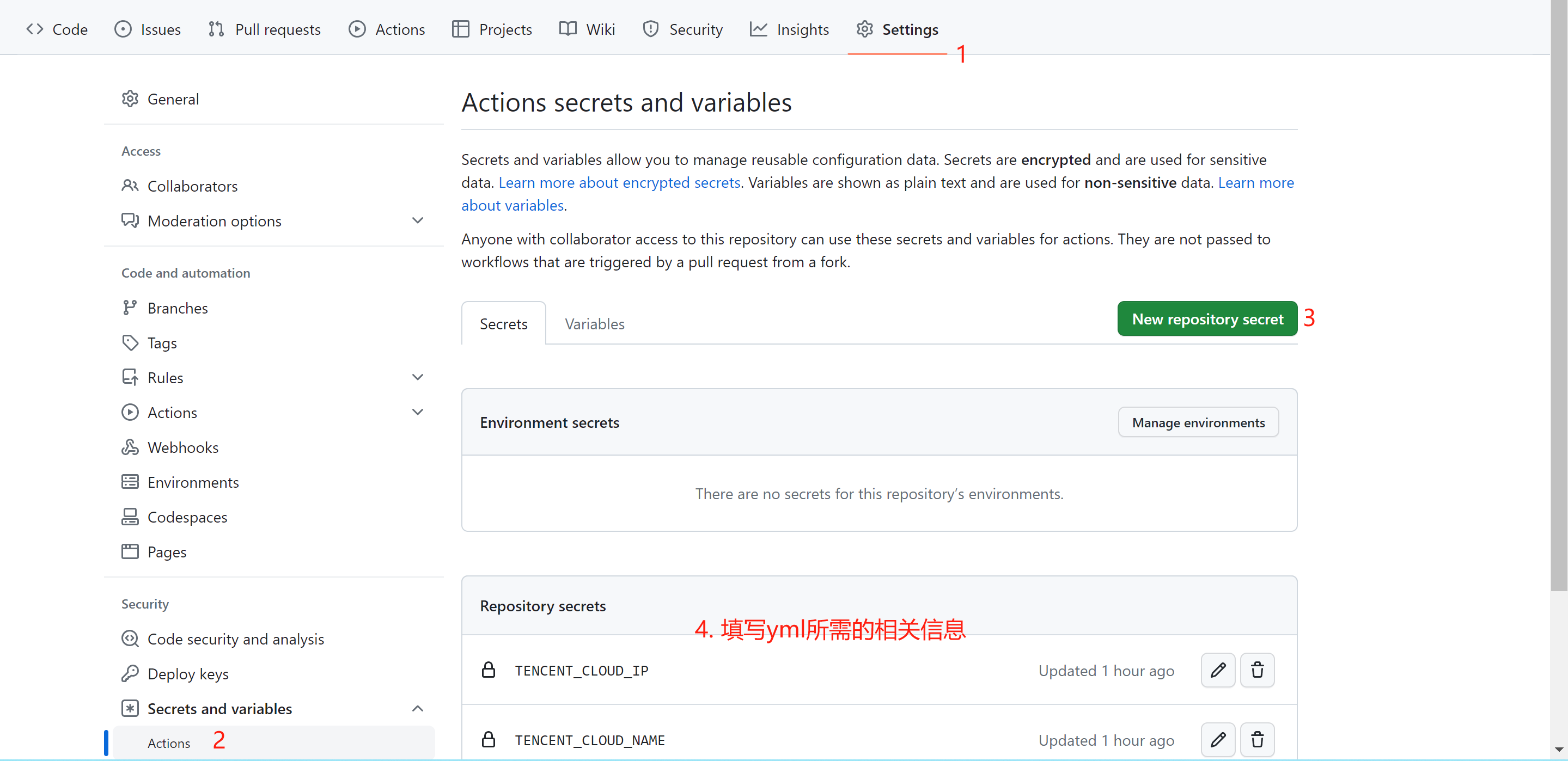
script:登录之后执行的指令,此处就是重新爬取内容
如上内容准备完毕之后,当我们提交了新的代码,部署上去之后,就会自动运行抓取内容